Time-Based Item Actions: notify, assign & route items

Time-Aware Item Creation Rules

Want monday to take different actions depending on when an item is created? That’s possible now!

Define your start and end times, and the app will automatically trigger the right workflow. A game-changer if your team works in shifts, service windows, or different time zones.

AutoAssign TimeMate: Key Benefits

01

Instantly notify the right people and auto-assign items created within a set time range.

02

Automatically assign items created between your defined working hours.

03

Keep your team updated with instant notifications when new items are created during specific time windows.

04

Automatically updates timeline column when start date and end date changes

Why us

Why Use TransFunnel's AutoAssign TimeMate App?

Built by certified monday.com engineers

Platinum Partner · since 2021

01

App available for use in ALL WORKSPACES, in monday platform

02

UNLIMITED USERS at no extra cost

03

TransFunnel - monday.com's Trusted PLATINUM SOLUTIONS partner - Premium Support

Trusted by 100+ customers worldwide

  • 10+ yrs
  • Platinum Partner
  • Unlimited seats

Smart New Features

Notify & Assign Together

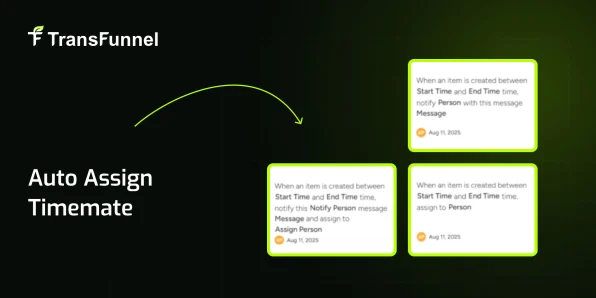
When a new item is created within your chosen time range, the app will: Instantly notify selected team members Assign the item to the right owner Perfect for routing tasks created during working hours directly to the right person.

Auto-Assign During Specific Hours

Need items created between certain times to always go to a specific team member? Now you can — no manual assignment needed. Great for shift-based teams, support desks, or on-call workflows.

Time-Based Notifications

Want to keep certain stakeholders updated only for items created in a time window? The app can send real-time notifications without changing ownership. Ideal for alerts, monitoring, or compliance checks.

How to Use?

  • 01 Install the App
    Install the app from the monday.com Marketplace
  • 02 Select Your Board & Columns
    Select your file source and destination (columns, items, or boards)
  • 03 Set Up Automations
    Set up automation triggers (Item create)
FAQ

Got questions? We have the answers.

Can I use multiple time rules?

Yes, you can set up different automations for different time windows.

Does it integrate with monday automations?

Absolutely — it plugs right into monday’s native automation recipes.

Why TransFunnel?

TransFunnel is the monday.com GOLD Solutions Partner helping the monday.com users with premium Consulting, professional & Licensing services. Having enabled 10,000+ organisations worldwide over the past decade, we understand the pain points and needs of the teams and provide custom solutions and apps created specifically to enable the monday.com users to make the most of the monday platform. Check out our monday professional services and reach us for ANYTHING monday.com ! Happy to connect.

Book Your Demo Today