
Clients Who Trust Us





















From ticket chaos to service control
Do your teams experience scattered channels, unclear ownership, and zero visibility once a request lands? HubSpot Service Hub fixes that, when it’s configured to match your reality. Here’s what we fix, fast.
Requests trapped in inboxes
Centralize email, chat, forms, and calls into a real ticketing system—so nothing disappears.
Slow triage and messy handoffs
Automate routing, priority rules, and escalations with workflows and SLAs.
No shared customer context
Put every interaction in the CRM record so service, success, sales, and marketing stay aligned.
Manual updates and follow-ups
We set rule-based automations to update statuses, notify owners, and nudge the right people at the right time without extra meetings.
Reporting that’s always “next month”
Build service analytics dashboards that show volume, SLA risk, and resolution trends in real time.
How We Make HubSpot Service Hub Work for You

Implementation & help desk design
We set up HubSpot Service Hub around how your team actually supports customers: ticket pipelines, views, queues, forms, and routing—built for speed and clarity.

Automation, SLAs & routing
Cut the busywork. We build workflows for triage, assignment, escalations, and follow-ups—then add SLA rules so priorities are real, not “whoever yells loudest.”

Knowledge base, customer portal & feedback
Deflect tickets without feeling distant. We structure your knowledge base, launch a secure customer portal, and wire up NPS/CSAT feedback so you can prove service quality—then improve it.

Onboarding, enablement & ongoing optimization
We make adoption stick: role-based training, playbooks, and a rollout plan. Already on Service Hub Professional? Great—then we focus on HubSpot Service Hub optimization: cleaner processes, smarter automation, and reporting that leaders will actually use.
AI in HubSpot Service Hub: faster support, same control
HubSpot’s AI (Breeze) isn’t here to put on a show. It’s here to take work off your agents’ plates—without giving up quality, brand voice, or governance. Use AI to handle the repeatable 80%, surface the real issues faster, and keep humans on the conversations that actually need them.
- Deploy a Breeze Customer Agent for instant, 24/7 answers—grounded in your approved content, with clean handoff to humans when confidence is low.
- Summarize long ticket threads into crisp context, so agents stop rereading history and start resolving.
- Generate reply drafts that match your tone (and your policies). You edit, approve, send. No surprises.
- Auto-categorize and route tickets based on intent, priority, and customer context—then back it up with SLAs.
- Turn resolved tickets into a stronger knowledge base: draft new articles, spot content gaps, and reduce repeat volume over time.
- Spot patterns early (top issues, escalation drivers, deflection opportunities) so service becomes proactive—not just reactive.
Ready to make support feel calm again?
We’ll help you choose the right setup, implement HubSpot Service Hub, and get teams live—without the “where did that ticket go?” moments.
How Our Consultants Helps You Streamline HubSpot Service Hub
Our HubSpot Service Hub specialists keep it practical. We design the service system, prove it with real tickets, then scale with standards that teams won’t fight.
Discover
map channels, ticket types, SLAs, and what “good” looks like (for customers and for ops).
Design
build pipelines, forms, views, routing rules, knowledge architecture, and reporting.
Deploy
configure, test with real scenarios, train teams, and launch with clean cutover.
Optimize
tune automation, close reporting gaps, and keep improving (the best Service Hub setup is the one that evolves).
Engineered for Your Entire Team
From the people doing the work to the people accountable for outcomes
PMO & Leadership
portfolio visibility, governance, and executive-ready reporting.
Operations
repeatable processes, approvals, and exception handling that doesn’t derail the day.
Marketing
campaign planning, creative workflows, and launch coordination with real dependencies.
Sales Ops
request intake, enablement projects, and cross-team handoffs that stay traceable.
IT & Service Teams
standardized workflows, visibility, and control for change, delivery, and support.
Frequently Asked Questions
Everything you need to know about our HubSpot services. Can't find an answer? Chat with our team.
What is HubSpot Service Hub?
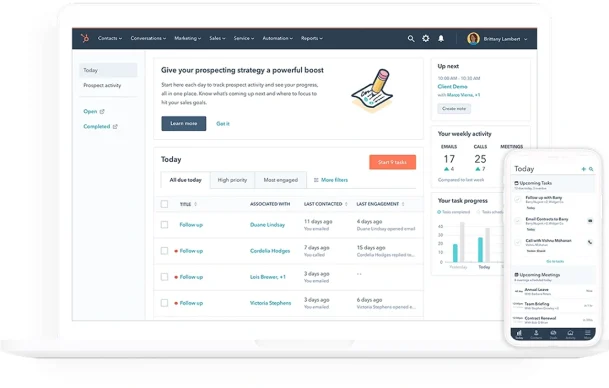
HubSpot Service Hub is HubSpot’s customer service and success product. It brings ticketing, SLAs, omnichannel inbox, knowledge base, customer portal, and feedback tools into one CRM-connected system.
What are the HubSpot Service Hub features teams use most?
Typically: help desk + tickets, automation and routing, SLA management, knowledge base, customer portal, and service analytics. We’ll shape the setup around your workflow, not a generic pipeline.
What does HubSpot Service Hub onboarding look like?
We start with your support process and channels, then configure pipelines, SLAs, automations, and reporting. Training is role-based, so agents, managers, and ops teams each get what they need to run the system.
How does HubSpot Service Hub pricing work—and do we need Service Hub Professional?
Pricing depends on your team size and the capabilities you need (automation depth, SLAs, reporting, and more). If you want structured routing, SLAs, and scalable service operations, HubSpot Service Hub Professional is often the practical starting point. We’ll help you choose without overbuying.
Do you help with HubSpot Service Hub implementation and optimization?
Yes—end to end. We implement the core setup, launch self-service, connect integrations where needed, and continuously optimize workflows and reporting as volumes grow.
If you want, share your current support flow (or the chaos around it). We’ll tell you exactly what to standardize, what to automate, and what to leave alone, so Service Hub HubSpot becomes a system you can trust.
Clean data. Faster resolutions. Clear processes
We help you pick the right tier, handle onboarding, and deliver optimization that sticks.