Template creation in monday.com should be fast, flexible, and fully personalized all in just one click.
Flexi Template Creatorempowers teams to generate multiple custom boards from a single master template by selecting and combining groups with ease. Launch multiple tailored boards instantly, without repetitive manual work.
It’s the ideal solution for teams that frequently replicate processes, templates, or project setups with slight variations.
App available for use in ALL WORKSPACES, in monday platform
02
UNLIMITED USERS at no extra cost
03
TransFunnel – monday.com's Trusted PLATINUM SOLUTIONS partner – Premium Support
Trusted by 100+ customers worldwide
10+ yrs
Platinum Partner
Unlimited seats
Smart New Features
Checkbox-Based Group Selection
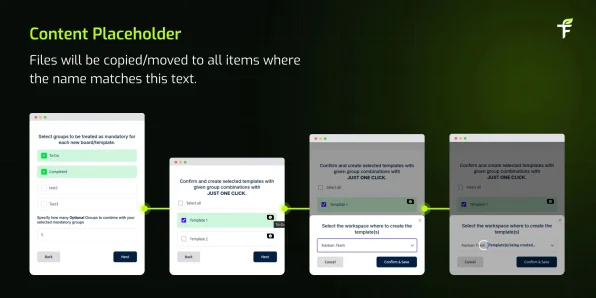
Select groups from your master board using an intuitive interface. Easily mark groups as mandatory or optional no complexity involved.
Automatic Group Combination Generation
Specify how many optional groups should be combined with mandatory ones, and it will automatically generate all valid board combinations.
One Click Board Creation
Skip repetitive setup work. Confirm your selections and create all customized boards instantly by a single click.
Workspace Assignment
Assign newly created boards to the appropriate workspace to keep your monday.com account structured and organized.
Custom Board Naming
Add unique, meaningful names to each generated board for easy identification and tracking.
How to Use Flexi Template Creator
01 Install the app from the monday.com Marketplace
02 Select a master board or existing template
03 Choose mandatory groups (included in every board)
04 Select optional groups and define how many should be included per combination
05 Customize board names, if required
06 Select the target workspace
07 ClickCreateall boards are generated instantly
Note: Should have three or more group in order to create multiple boards.
Access Permission:
Admin: Full access
Member: Can use the app
Viewer: No access
Guest: No access
Why TransFunnel?
TransFunnel is the monday.com GOLD Solutions Partner helping the monday.com users with premium Consulting, professional & Licensing services. Having enabled 10,000+ organisations worldwide over the past decade, we understand the pain points and needs of the teams and provide custom solutions and apps created specifically to enable the monday.com users to make the most of the monday platform. Check out our monday professional services and reach us for ANYTHING monday.com ! Happy to connect.



 01
01
 02
02
 03
03
 Install the app from the monday.com Marketplace
  Select a master board or existing template
  Choose mandatory groups (included in every board)
  Select optional groups and define how many should be included per combination
  Customize board names, if required
  Select the target workspace
