Automate File Transfers in monday.com with Conditional File Mover
Let automation handle your file movement — intelligently, flexibly, and without manual effort. Conditional File Mover allows you to copy or move files across columns, items, and boards based on smart conditions like text matches, group selections, and more.
App available for use in ALL WORKSPACES, in monday platform
02
UNLIMITED USERS at no extra cost
03
TransFunnel – monday.com's Trusted PLATINUM SOLUTIONS partner – Premium Support
Trusted by 100+ customers worldwide
10+ yrs
Platinum Partner
Unlimited seats
Smart New Features
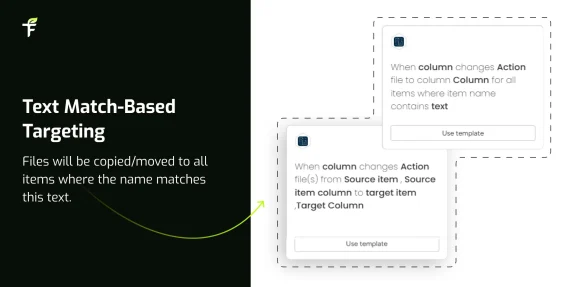
Text Match-Based Targeting
Want a way monday could find your target items where the file is to be moved — just based on TEXT MATCH? That’s possible now.
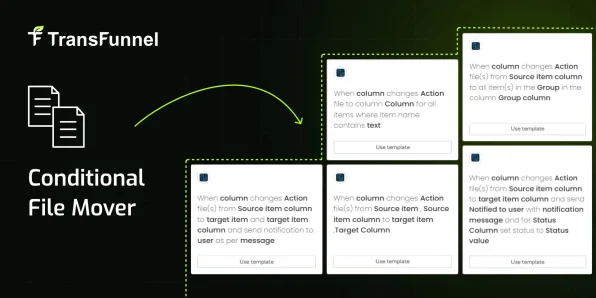
Group-Wide File Moves
Till now, there was no way to copy/move a file to all items in a chosen group. Now you can — easily and automatically.
Send Notifications & Flip Status
Want to send a notification or flip the status column when a file is moved? You can do that too, with ease.
Item-to-Item File Transfer
Want only one specific item’s files copied/moved to another given item? Now you can choose the source and target items, along with file columns — perfect for workflows like sequential approvals.
Move Files to a Target Without Knowing the Source
Not sure about the source item but want files to be moved to a given target item? That’s possible too — and notifications can be triggered on movement.
How to Use?
01 Install the App Install the app from the monday.com Marketplace
02 Select Your Board & Columns Select your file source and destination (columns, items, or boards)
03 Set Up Automations Set up automation triggers (status change, date, group change, text match, etc.)
04 Automate & Boost Productivity (Optional) Configure actions like notifications and status updates Let Conditional File Mover do the work — hands-free
Example
This recipe works when the file is copied within the same column. For example, if a file appears in File1 column, it will be copied to the matching item’s File1 column.
Known Limitations
Please note the following limitations affecting the automation:
When only one PDF is present in the column, the automation works for up to 100 items reliably.
When multiple PDFs are present in a single column and the automation is configured to copy them into another column:
In such cases, the automation may only work for 24–25 items.
Why TransFunnel?
TransFunnel is the monday.com GOLD Solutions Partner helping the monday.com users with premium Consulting, professional & Licensing services. Having enabled 10,000+ organisations worldwide over the past decade, we understand the pain points and needs of the teams and provide custom solutions and apps created specifically to enable the monday.com users to make the most of the monday platform. Check out our monday professional services and reach us for ANYTHING monday.com ! Happy to connect.
Conditional File Mover is fully automation-driven and supports advanced logic like text matching, group-wide transfers, and targeted item-to-item moves.



 01
01
 02
02
 03
03
 Install the App
 Select Your Board & Columns
 Set Up Automations
 Automate & Boost Productivity