Our QR Code integration allows you to instantly generate QR codes for board items, helping teams with inventory management, tracking, and seamless workflows. Automate QR code creation, enhance data accessibility, and improve operational efficiency.
Automated QR Code Generation
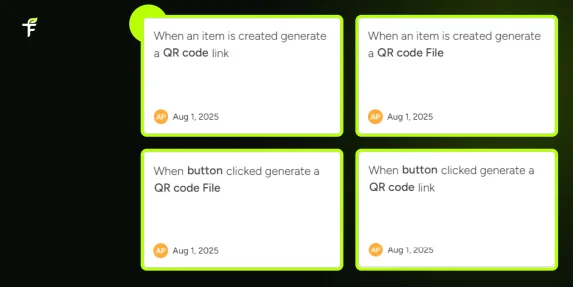
When an item is added to your monday.com board, a QR code is automatically generated and linked.
Automated QR Code Link Generation
When an item is added to your monday.com board, a QR code link is automatically generated
Automated QR Code for Subitems
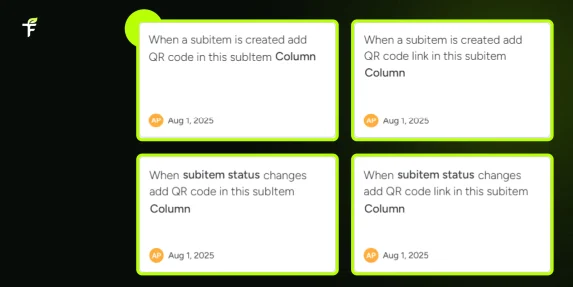
Automatically generate and save a QR code or link for subitems based on different triggers like creation, status change, button click or column updates.
Automated QR Code for Custom Link
Generate a QR code from any custom URL and automatically save it to your chosen column when triggered.
Easy Scanning & Accessibility
Team members can scan QR codes to instantly access item details.
Works Across All Workspaces & Boards
Generate QR codes for any board in your monday.com account.
Secure & Efficient
Your data remains within your monday.com account, ensuring security and reliability.
Improved Operational Efficiency
Timely updates even by field teams through mobiles.
App available for use in ALL WORKSPACES, in monday platform
02
UNLIMITED USERS at no extra cost
03
Transfunnel – monday.com's Trusted PLATINUM SOLUTIONS partner – Premium Support
Trusted by 100+ customers worldwide
10+ yrs
Platinum Partner
Unlimited seats
How to Use?
01 Install the App Go to the monday.com app marketplace and install the Instant QR Codes app.
02 Select Your Board & Columns Choose the board and the column where you want QR codes generated.
03 Automate QR Code Creation Every time an item is added or updated, a QR code is automatically generated.
04 Scan & Share Use any QR scanner to access item details directly from your monday.com board.
Generate QR Code/Link for Board item
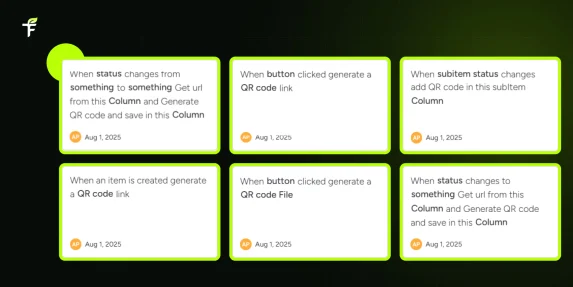
On item creation, automatically generate a QR code link or downloadable QR code file.
On button click, trigger the generation of a QR code link or QR code file for any board item.
Generating QR codes for subitems automatically:
New EXCLUSIVE Feature:
On subitem creation, instantly generate and store a QR code or QR code link in a selected column.
On subitem status change, automatically update the subitem column with a QR code or a QR code link.
Ideal for tracking subitem progress, labeling tasks, and enhancing item traceability across boards.
Custom URL-Based QR Code Generation
New EXCLUSIVE Feature:
Dynamically create QR codes from custom URLs stored in specific columns:
On status change (to/from specific values): Extract the URL from a designated column, generate a QR code, and save it in the target column.
On any status change: Automatically fetch the URL and generate a QR code.
On subitem status update: Pull the URL from the subitem’s column and store the QR code in the chosen subitem column.
This is perfect for linking external resources, files, or tools directly from board items and subitems.
Why TransFunnel?
TransFunnel is the monday.com GOLD Solutions Partner helping the monday.com users with premium Consulting, professional & Licensing services. Having enabled 10,000+ organisations worldwide over the past decade, we understand the pain points and needs of the teams and provide custom solutions and apps created specifically to enable the monday.com users to make the most of the monday platform. Check out our monday professional services and reach us for ANYTHING monday.com ! Happy to connect.



 01
01
 02
02
 03
03
 Install the App
 Select Your Board & Columns
 Automate QR Code Creation
 Scan & Share